

These three roles govern workspace administration. They are separate from org-level roles (Owner, Creator, Editor, Viewer, Workspace-only) — for those, see Org permissions and roles.
The three workspace roles
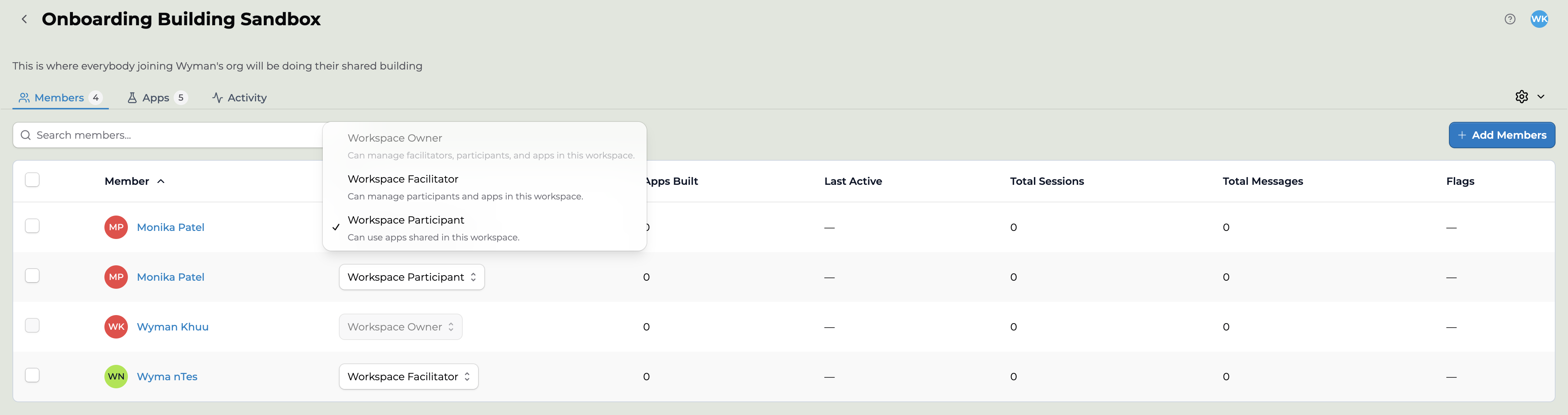
The workspace-level roles, shown in the member role picker.
Permissions by role
✓ allowed · — not allowed. The one capability that separates Owner from Facilitator is deleting the workspace.
Key takeaways
A Facilitator can do everything an Owner can, except delete the workspace. Owner and Facilitator differ by exactly one permission. A Facilitator can manage members, manage apps, view and export insights and activity, and review moderated content. The one thing they cannot do is delete the workspace itself. A Participant is view-only at the workspace level. They can see the workspace and use the apps shared into it, but cannot edit settings, see other members, view insights or activity, or manage anything. Roles don’t carry between workspaces. The mapping is flat: each role’s permission set is independent, and a person’s role is set per workspace. Being an Owner in one workspace says nothing about your role in another.Two caveats worth flagging
Workspace creation is an org-level permission. Who can create a workspace is granted at the organization level, not by any of the three workspace roles above. See Org permissions and roles. Content access is a separate layer. These three roles govern workspace administration. What a person can actually open or edit among the apps and collections inside the workspace is driven by app- and collection-level permissions. See App privacy and visibility.Key points
- Three workspace roles: Owner, Facilitator, Participant
- Owner and Facilitator differ only by the ability to delete the workspace
- Participant is view-and-use only; it cannot manage anything
- Roles are set per workspace and do not cascade between workspaces
- Workspace creation is an org-level permission, not a workspace role
FAQ
What's the difference between Owner and Facilitator?
What's the difference between Owner and Facilitator?
Exactly one thing: an Owner can delete the workspace and a Facilitator cannot. Everything else — managing members and apps, viewing and exporting activity and insights, reviewing moderated content — both can do.
Can a workspace have more than one Owner or Facilitator?
Can a workspace have more than one Owner or Facilitator?
Yes. A workspace can have multiple Owners and multiple Facilitators. Keep the number of people who can delete the workspace small.
How do I change someone's workspace role?
How do I change someone's workspace role?
Open the workspace Members tab, find the person, and pick a new role from the list — the change applies right there. See Adding members and inviting users.
If I'm a workspace Owner, am I an organization Owner too?
If I'm a workspace Owner, am I an organization Owner too?
No. Workspace roles and org roles are independent, even though both use the name Owner. A workspace Owner controls one workspace; an organization Owner has access across the whole organization. See Org permissions and roles.
Can a Participant build apps in the workspace?
Can a Participant build apps in the workspace?
Whether a Participant can build is controlled by the workspace’s building-permission toggles, not by the role itself. See Workspace building permissions.
Last updated: 06-26-2026 Contact us at [email protected]